Clemente Tech News – May 2002
Clemente Tech News | May 2002 | Volume 1 | Issue 5

Scholastic Reading Inventory
Teachers using the Scholastic Management Suite to view and/or print their students’ reading test results should be aware that when they quit the program, they might see a message about running a maintenance program.
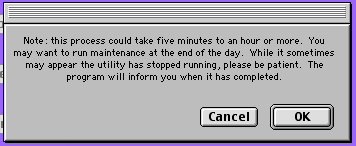
PLEASE DO NOT CLICK OK; CLICK CANCEL. Clicking OK will cause the computer to run the database maintenance program. Running the maintenance takes an extremely long time, and stopping the process could cause data loss in the Scholastic program.
Scholastic Reading… in the Classroom
Computers will soon be updated to allow students to take the Scholastic Reading Inventory right in their classrooms! If your classroom has a Power PC 5200 or higher, including the iMac, your students will be able to use the computer to take the test. LC580’s, LC575’s, and the stand-alone computers will not be able to perform this task.
A Scholastic database update has been scheduled for classroom computers for Wednesday, May 15th at 9 AM. At this time, a computer technology assistant may visit your room to ensure that the network computers are on and functioning. We ask that no one attempts to use the computers at that time. The update is not a long process, but it is advised that no one use the computers until it has been completed.
Logging in for testing
Once the update has been completed, students will be able to log in to Macintosh Manager and access the Reading Inventory program. Students will not log in using their name and password as they would to access their regular programs and documents. Instead they must log in as “test” (typed where the name usually goes) without a password.
They must then click the Scholastic Reading Inventory icon to start the program. They will be prompted to enter their name: first name, then last name, separated by ONLY one space. Please advise students to be careful to type their names exactly as the names appear in their teacher’s class in the Scholastic program.
Gone tomorrow
Yes, the word out is true: The Internet filter earlier implemented by Information Technology and Curriculum offices has been removed until further notice. The filter had caused our network to slow down significantly, beside blocking out sites that teachers and students needed for educational purposes.
Teachers, please be reminded that students should be monitored when using Internet services. If students need to have Acceptable Usage Policies signed and returned in order to be eligible for Internet access, please request forms from your Computer Technology Department in Room 112. Thank you for your cooperation and support in this very important area of technology and education.
© 2002-2004 Roberto Clemente Middle School
Please e-mail your feedback to our webmaster.
Ron Walker, Webmaster, Clemente School Internet Website
Bruce Stern, Webmaster, School Intranet Website
T Martin, Editor, Clemente Tech News
 Previous Post